 Русский
 English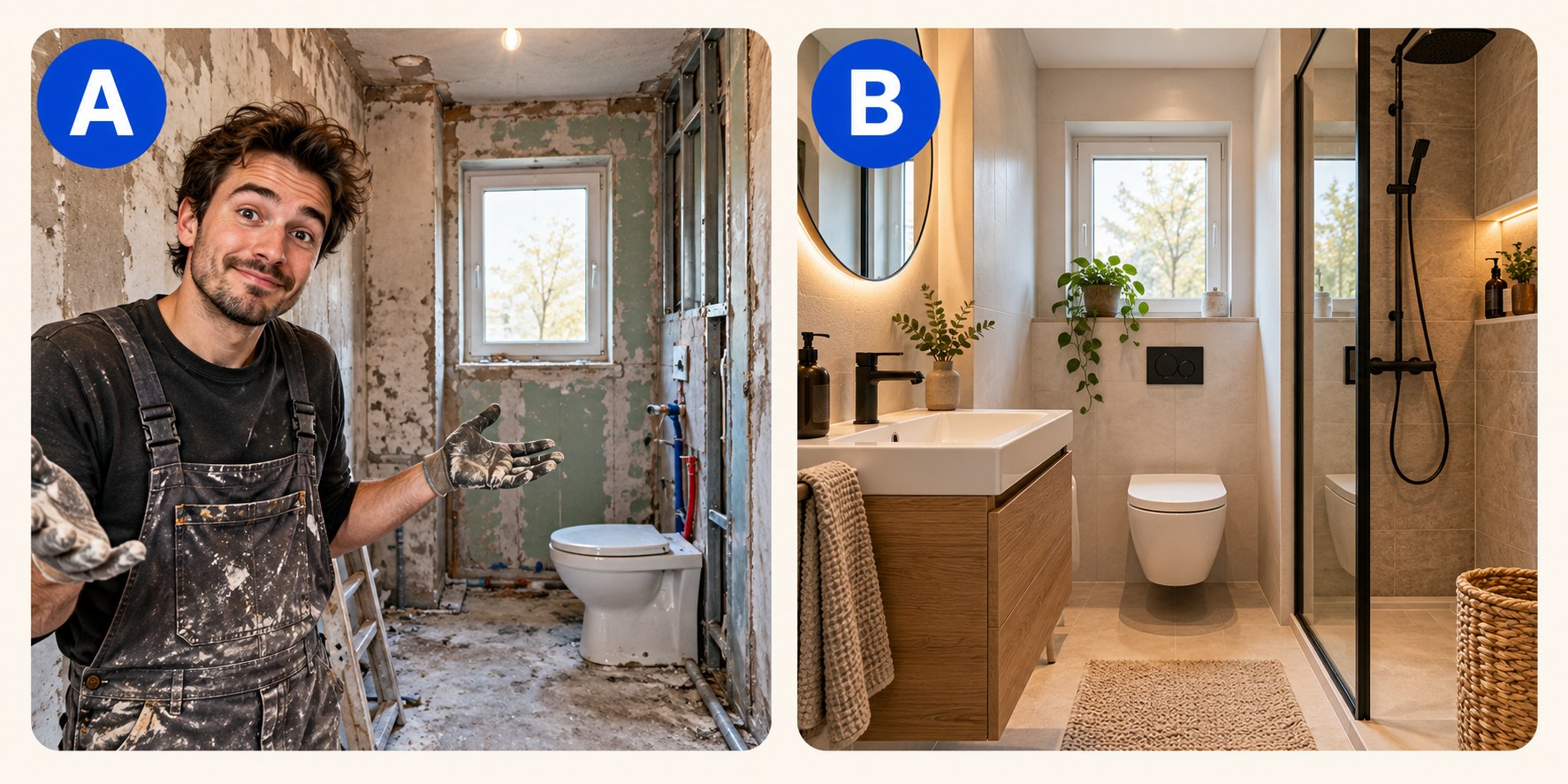
A YouTube thumbnail A/B test compares alternative packaging for the same video while viewers encounter it. It is more useful than asking friends to pick their favorite design: the built-in experiment evaluates watch time from real audiences. This guide explains how to prepare meaningful alternatives, run the test in Studio, interpret the result and handle videos that are not eligible.
Two ways to compare thumbnails
The built-in experiment runs alternatives concurrently. Viewers are allocated across versions, so each version encounters broadly the same period of news, demand and channel activity. This reduces the confounding that comes from showing one image this week and another next week.
A manual replacement is a before-and-after observation. You upload A, wait, replace it with B and compare periods. That can be useful, but the audience may have changed along with the image. Traffic sources, publication age and seasonal interest all affect the comparison. A higher CTR after a replacement does not, by itself, prove that the new thumbnail caused the improvement.
Use the built-in experiment when the video qualifies. Use manual replacement to fix an obvious error or to investigate a hypothesis where an experiment is unavailable, while keeping the limits of that evidence clear.
What the built-in test does
In desktop YouTube Studio, A/B Testing lets eligible creators compare up to three titles, thumbnails, or title-and-thumbnail combinations. The decision is based on watch time, not simply on the proportion of people who click. YouTube describes the workflow and current restrictions in its A/B testing documentation.
- Tests can take a few days and should finish within two weeks.
- A small control group may see only the default packaging and be excluded from the experiment calculations.
- When there is a clear winner, YouTube applies it. Otherwise, the first uploaded option becomes the default.
- Changing a title or thumbnail during the experiment stops it; you then need to restart.
Upload a credible default first. If the experiment cannot establish a winner, this is the option viewers will continue to see. For the reasoning behind the watch-time criterion, see why the thumbnail with more clicks can lose.
Check eligibility before making variants
| Video or situation | Can you run the test? |
|---|---|
| Eligible public long-form video | Yes, with advanced features enabled |
| Archived livestream | Yes, subject to the other restrictions |
| Short | No |
| Scheduled livestream | No |
| Premiere | Only after it ends and becomes a long-form video |
| Private, made-for-kids or mature-audience content | No |
| Age-restricted content | No |
| Channel without advanced features | No |
| Studio on a phone | No; testing is desktop-only |
Custom-thumbnail access and advanced-feature access are different requirements. Being able to upload an image does not automatically mean that the channel can run experiments. If the button is missing, check feature eligibility as well as the video settings.

How to start a thumbnail A/B test
- Prepare the images and check them at a small display size. Correct spelling, misleading details and unreadable text before testing.
- Open YouTube Studio on a computer, choose Content and select the video. You can also configure a test while uploading an eligible new video.
- Use A/B Testing near the title or thumbnail area. Select Thumbnail only, Title only, or Title and thumbnail.
- Add up to three options, putting your preferred fallback first, then finish and save.
- Leave the tested packaging unchanged. Review progress on the video’s Details page or under Analytics, Reach and Manage test.
- Wait for the final result before deciding what the experiment taught you.
Use consistent, good-quality source files. YouTube warns that if any thumbnail in a test is below 1280 × 720, the experiment’s thumbnails are downscaled to 854 × 480. That testing threshold is separate from the current general upload recommendation. See YouTube thumbnail dimensions and file limits for the full specification.
Choose the question before choosing the pictures
A useful experiment begins with a hypothesis: “Viewers of this renovation video care more about the finished room than the building process,” or “A concrete result is more compelling than a general question.” Without that question, a winning image gives you a file to use but little to apply to the next video.
There are two legitimate approaches. To isolate a particular design choice, keep other elements stable and change that choice. To select the strongest overall packaging, compare distinct concepts. A concept test may change the subject, copy and composition together; just do not claim that the result proves which individual element caused the difference.
Differences need to survive the feed. Moving a caption slightly or changing the background by a shade may be invisible on a phone. Put the alternatives side by side at viewing size. If you have to explain where they differ, reconsider the test.
| Video | Question | Option A | Option B |
|---|---|---|---|
| DIY bathroom renovation | Process or outcome? | Creator holding tiles in the unfinished room | The completed bathroom |
| A year of regular saving | Concrete result or evaluation? | The actual total saved | “WORTH IT?” |
| A month with a robot vacuum | Product or real-world task? | Vacuum against a clean background | Vacuum facing crumbs on a rug |
| Cooking outdoors | Dish or cook? | A close-up of the finished meal | The cook working beside the fire |
| Completing a game without dying | Does a caption add clarity? | The decisive gameplay moment | The same scene with “0 DEATHS” |
These are invented teaching examples, not performance case studies. Every option must remain accurate to its video. For a video with modest exposure, two strong alternatives can be more practical than forcing a third weak idea into the experiment.
Read the result without overstating it
| Status | What it tells you | Next step |
|---|---|---|
| Winner | One option produced a statistically significant watch-time advantage in this experiment | Use it and record the hypothesis, video and audience context |
| Performed the same | The test did not find a meaningful performance separation between the options | Choose the clearest, most accurate option; avoid claiming universal equality |
| Inconclusive | The experiment did not establish a clear difference | Review exposure and how distinct the concepts were; leave the hypothesis open |
A non-winning result is not evidence that design never matters. The alternatives may be similarly effective, too similar to distinguish, or tested with insufficient exposure. Likewise, one win is not a permanent rule for a niche. Repeat the underlying idea on comparable videos before making it part of your standard process.
Do not try to reconstruct a per-variant winner from an aggregate CTR chart. Studio’s general analytics provide context; the experiment provides its own result. A more clickable idea can attract viewers who leave early and therefore fail to generate the strongest watch-time outcome. The separate guide to test duration explains why early leads are not final decisions.
When you have to replace the image manually
- Choose a video with reasonably stable exposure rather than one whose audience changes dramatically hour by hour.
- Save the original thumbnail and record impressions, impressions CTR and average view duration by the main traffic sources.
- Change only the thumbnail if that is the variable you want to investigate.
- Compare equal calendar windows with the same days of the week. Seven days before and after is an example, not a significance threshold.
- Note events that could change demand: another upload, a news story or a seasonal peak.
- Check viewing behavior as well as clicks. If the image attracts a different audience, the CTR alone may give a misleading impression.
- Leave small or noisy differences unresolved instead of presenting them as a win.
Shorts do not support this A/B test. Current YouTube guidance allows a custom Shorts image through desktop Studio, but a before-and-after check remains observational. Its results should not be confused with the separate measures describing behavior in the Shorts feed.
For a broader decision framework, read when to change a published video’s thumbnail.
Prepare alternatives efficiently
The Bloggers.tools thumbnail generator uses the video’s subtitles as context. In Professional mode, you choose among three concepts before generating an image; these are not three finished thumbnails included in one generation. Each additional finished alternative is a separate generation.
Add your own portrait or product reference where identity matters, then verify every result against the actual video. Transcript input helps with context but cannot guarantee visual accuracy. Download the finished JPG and upload it yourself to Studio; the service does not need access to your channel. Refinement availability depends on your plan.
Frequently asked questions
How many YouTube thumbnails can I test at once?
Up to three options in the built-in experiment. You can test thumbnails, titles or combinations. Prioritize genuinely different, accurate ideas rather than filling every slot.
Can I A/B test Shorts thumbnails?
No. Custom Shorts uploads and A/B testing are separate features. You can update an eligible Short’s custom image in desktop Studio, but YouTube’s built-in experiment does not include Shorts.
Why is the A/B Testing button missing?
Check that you are on desktop, advanced features are enabled and the video is eligible. Private, made-for-kids, age-restricted and other excluded formats do not qualify.
Can I change the thumbnail while a test is running?
Changing the title or thumbnail stops the experiment. If you discover a misleading or incorrect image, fixing it takes priority, but the test will need to restart.
Why can a more clickable thumbnail lose?
The test evaluates watch time rather than clicks alone. An image that attracts fewer but better-matched viewers can outperform one that prompts many short visits.