 Русский
 English
Click-through rate is one of those metrics that looks simple on the surface but gets complicated fast. A 4% CTR can be excellent for one channel and mediocre for another. Context matters more than the number itself, and understanding that context is the difference between chasing a vanity metric and actually growing your channel.
The data tells an interesting story, your traffic source changes everything, and there are concrete fixes when your CTR is underperforming. This article covers all three.
Key Takeaways
-
The platform-wide CTR median sits at roughly 4% to 5%
-
New and smaller channels often see higher CTR naturally
-
Traffic source dramatically changes what "good" looks like
-
Thumbnail and title together drive CTR more than either alone
What YouTube's own data says about average CTR
YouTube has shared that half of all channels and videos see a CTR between 2% and 10%. The median sits somewhere around 4% to 5% across the platform. But that single stat hides enormous variation.
A channel with 10 million subscribers will typically see lower CTR than a new creator with 5,000 subscribers. Why? Because large channels get shown to cold audiences constantly. YouTube pushes their content to people who've never seen them before, and those viewers are harder to convert. Smaller channels often reach a tighter, warmer audience, which inflates the rate.
So "good" isn't a fixed number. It's relative to your channel size, niche, and where those impressions are coming from.
CTR benchmarks by channel size in 2026
|
Channel size (subscribers) |
Typical CTR range |
Notes |
|
Under 1,000 |
6% to 14% |
Mostly loyal early audience |
|
1,000 to 10,000 |
4% to 10% |
Mix of subscribers and discovery |
|
10,000 to 100,000 |
3% to 7% |
Growing Browse exposure |
|
100,000 to 1M |
2% to 5% |
Heavier algorithm distribution |
|
1M+ |
1.5% to 4% |
Wide cold-audience reach |
These ranges are derived from YouTube's published Creator Academy data and aggregated creator community reporting. Individual channels will vary based on niche, content type, and posting frequency.
These ranges aren't hard rules. A niche channel about vintage watch repair with 500,000 subscribers might still pull 6% because their audience is highly targeted and self-selecting. A broad entertainment channel at 50,000 subs might sit at 3% because they're already getting heavy Browse impressions from YouTube's algorithm.
Why traffic source is the most overlooked CTR variable
Most creators look at their overall CTR and miss the real story. Your CTR breaks down by traffic source inside YouTube Studio, and each source has a completely different baseline.
Browse features
The homepage and suggested videos typically produce CTR between 3% and 9%. This is where thumbnail quality matters most, because viewers are scrolling passively and making split-second decisions. If your thumbnail doesn't stop the scroll in under a second, the impression is wasted.
Search traffic
Search usually sits lower, often between 2% and 5%. Searchers already have intent, but they're comparing multiple results side by side. A strong title that matches search language matters more here than a visually striking thumbnail.
Suggested videos
Appearing next to or after other content, suggested video CTR can range from 2% to 8% depending on how well your content relates to what the viewer just watched. Relevance to the preceding video is the key driver here.
External traffic
Links from social media, email newsletters, and websites often show very low CTR, sometimes under 1%. That's normal. The impression is counted when the video loads on an external page, but many of those viewers don't actually click through to YouTube. Don't let this number alarm you.
Subscribers feed
Your subscribers feed typically produces the highest CTR of any source, sometimes 8% to 15%, because these viewers already know and trust your channel. If your subscriber feed CTR is low, that's a signal worth investigating separately.
Comparing your Browse CTR to your Search CTR is like comparing apples to oranges. Evaluate each source on its own terms.
How CTR interacts with watch time
CTR gets your video clicked. Watch time determines whether YouTube keeps distributing it.
A video with 8% CTR but 30% average view duration will likely underperform a video with 5% CTR and 55% average view duration. According to YouTube's Creator Academy, the recommendation system weighs both signals together because high CTR with poor retention suggests the thumbnail or title overpromised what the video delivers.
This is the clickbait trap. A thumbnail that shocks people into clicking will spike your CTR short-term, but if viewers leave in the first 30 seconds, the algorithm pulls back distribution. Your CTR drops, your impressions drop, and the video stalls.
The goal isn't to maximize CTR in isolation. It's to find thumbnails and titles that attract the right viewers, people who'll actually watch and enjoy the content. A 5% CTR with 60% retention will outperform an 8% CTR with 25% retention almost every time.
What low CTR actually tells you
A CTR below 2% on Browse traffic is worth investigating. Before assuming your thumbnail is the problem, ask a few diagnostic questions.
Is your content being shown to the wrong audience? If YouTube is pushing your video to people who have no interest in your niche, they won't click regardless of how good your thumbnail is. This can happen when a channel pivots topics suddenly, or when a video's tags and description send mixed signals about the content.
Is your thumbnail competing poorly in context? Open YouTube on a fresh account or incognito window and search for your topic. Look at your thumbnail next to competitors. Does it stand out or blend in? Does it communicate a clear, specific benefit or emotion?
Is your title doing its job? A thumbnail catches the eye; the title closes the deal. If your title is vague, overly long, or doesn't answer "why should I watch this right now," you're losing clicks that your thumbnail earned.
Sometimes low CTR is a distribution problem, not a creative one. If YouTube is serving your video to completely cold audiences who've never engaged with your topic, even a great thumbnail won't overcome that mismatch.
Fixes that actually move CTR
Thumbnail changes
The fastest way to test a thumbnail is to swap it on a video that's still getting impressions. YouTube Studio shows impression data with a date overlay, so you can see if the new thumbnail changes the click rate within a few days. Give each version at least 500 impressions before drawing conclusions.
A few things that consistently improve thumbnail performance:
-
Clear focal point. One dominant visual element, not four competing ones. Viewers decide in under a second, and a cluttered thumbnail loses that decision.
-
High contrast. Thumbnails that get lost against YouTube's white background or dark mode lose clicks. Bold colors and strong outlines help your video stand out in a crowded feed.
-
Faces with emotion. Not every niche benefits from this, but in most content categories, a face showing a clear emotion (surprise, excitement, concern) outperforms text-only thumbnails.
-
Readable text at small size. Check how your thumbnail looks at 120 pixels wide. That's how it appears on most phones. If the text is unreadable at that size, cut it or make it bigger.
-
Consistency with your channel brand. Viewers who've seen your thumbnails before should recognize them instantly. A consistent visual style builds pattern recognition that improves CTR over time.
Title changes
Short titles generally outperform long ones. YouTube truncates titles in Browse, so front-load the most important words. If someone searches "how to fix a leaky faucet," a title that starts with those words will outperform one that buries them at the end.
Don't use the same title format for every video. If every title is a question, viewers tune it out. Mix formats: statements, numbers, questions, and direct commands all work in different contexts. Variety keeps your titles feeling fresh rather than formulaic.
Audience targeting signals
If your CTR is low because YouTube is showing your video to the wrong people, fix the signal you're sending. Your video's first 24 to 48 hours of performance heavily influences who YouTube shows it to next. Promote new videos to your existing audience first (through community posts, email, or social) so the initial engagement data comes from people who already like your content. That teaches the algorithm who to target for broader distribution.
Shorts vs. long-form: do CTR rules apply?
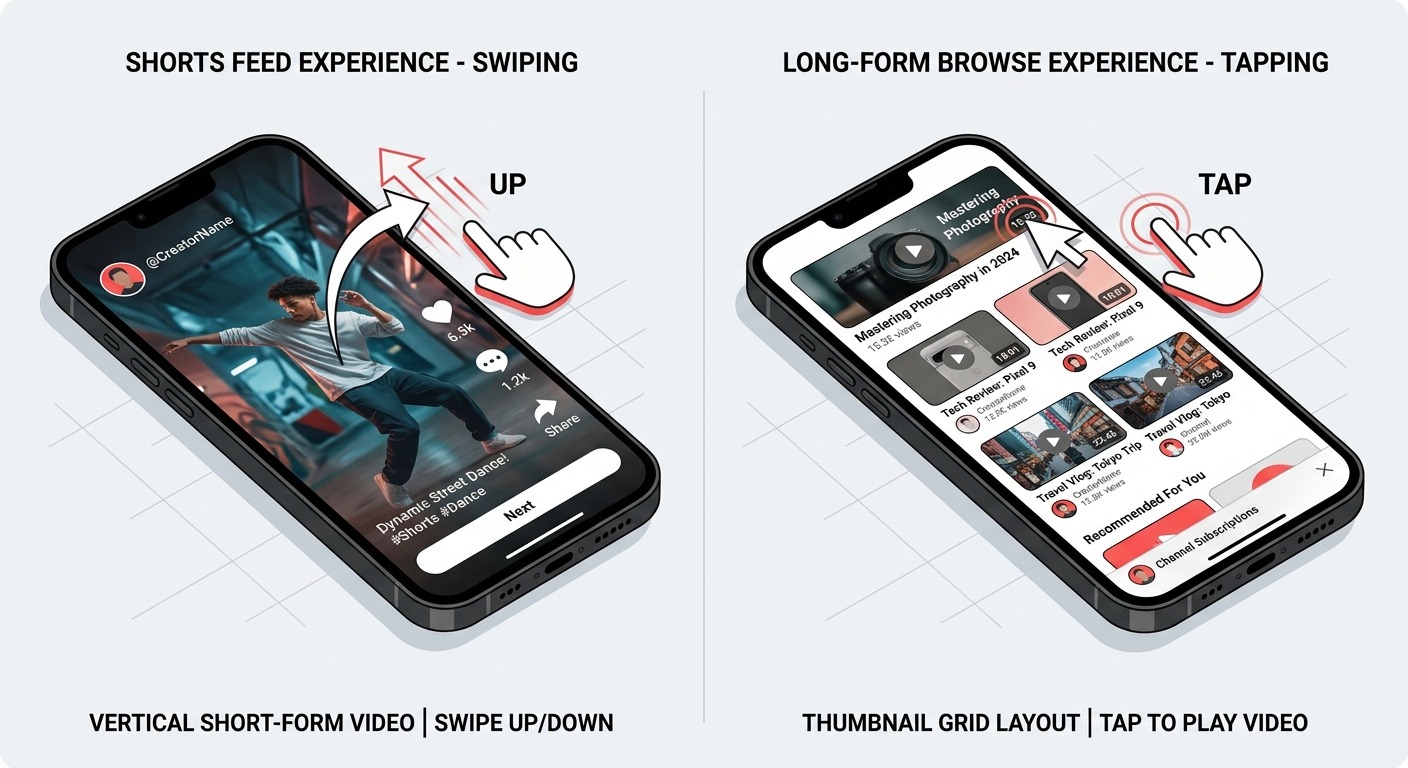
YouTube Shorts operates on a completely different delivery system. Shorts are shown in the Shorts feed, where viewers swipe rather than click. The CTR metric as it applies to long-form content doesn't translate directly to Shorts performance.
For Shorts, YouTube tracks views, swipe-away rate, and engagement rate instead. A high swipe-away rate in the first second is the Shorts equivalent of a low CTR. Your "thumbnail" for a Shorts video is actually the first frame, so optimizing that opening moment matters more than designing a traditional thumbnail.
That said, if your Shorts appear in Search or Browse as regular video results, they do generate CTR data in the traditional sense. In that context, the same benchmarks apply as they would for long-form content. It's worth checking your Shorts' traffic source breakdown in YouTube Studio to see how much of their reach comes from the Shorts feed versus Browse or Search.
When to stop worrying about CTR
There's a point where optimizing CTR has diminishing returns. If you're consistently above 6% on Browse traffic and your watch time is healthy, you're likely not leaving much on the table from a thumbnail perspective. Further gains will come from content quality, posting consistency, and building audience loyalty.
CTR is also a trailing signal. By the time you see a CTR problem in your analytics, the video has already been distributed. The better habit is to review CTR data across your last 20 to 30 videos, spot patterns, and apply those lessons to future content rather than obsessing over individual videos.
Growing channels tend to share one habit: they treat CTR data as a feedback loop, not a report card. Each video teaches you something about what your audience responds to, and that knowledge compounds over time.
Frequently Asked Questions
What is a good CTR for a new YouTube channel with low impressions?
New channels with under 1,000 subscribers often see CTR between 6% and 14%, since most impressions reach existing subscribers and close followers. That's normal. Once YouTube pushes your content to cold audiences through Browse and Suggested, expect the number to settle lower, typically between 4% and 8%.
Is 2% CTR bad on YouTube in 2026?
Not automatically. A 2% CTR on external traffic or on a large channel with heavy cold-audience distribution is acceptable. It becomes a problem on Browse traffic for a small or mid-sized channel, or in the Subscribers feed, where higher engagement is the norm. Always check the traffic source before drawing conclusions.
Does CTR matter more than watch time for the algorithm?
Neither dominates the other. YouTube uses CTR to set initial distribution, then watch time and retention to decide whether to keep distributing. Strong CTR with poor retention stalls fast. Weak CTR with excellent retention limits reach from the start. Both signals need to work together.
Why is my Browse CTR high but Search CTR low?
Browse viewers scroll passively, so a visually striking thumbnail drives clicks. Search viewers have specific intent and compare multiple results, so your title's relevance to the query matters more. High Browse CTR means your thumbnail is working. Low Search CTR usually means your title doesn't match how people phrase their searches.
How often should I test new thumbnails?
Test on any video actively receiving impressions and performing below your channel average. Give each version 48 to 72 hours and at least 500 impressions before deciding. Leave your best-performing videos alone unless there's a clear reason to change. Testing two or three underperforming videos at a time is a sustainable pace.
Can CTR benchmarks differ between Shorts and long-form videos?
Yes, significantly. Shorts are delivered through a swipe-based feed where traditional CTR doesn't apply the same way. YouTube measures Shorts through views, watch percentage, and engagement. If a Short appears in Search or Browse as a standard listing, it generates CTR data, and the same long-form benchmarks apply in that context.
Is CTR different for paid YouTube ads vs. organic videos?
Completely different. Paid ads measure CTR as clicks on a call-to-action button or overlay, not thumbnail clicks. Industry benchmarks from WordStream put typical CTR for skippable in-stream ads between 0.3% and 0.5%. Organic video CTR measures thumbnail clicks from impressions, which is a fundamentally different action with different benchmarks entirely.